Customer issues do not always fit neatly inside the support team’s domain. Sometimes a ticket needs a quick update from finance, an urgent product fix from engineering, or a delivery update from logistics. Zendesk’s collaboration features and integrations with Slack and Jira enable seamless participation from everyone, preserving context and maintaining process efficiency.
This playbook will walk you through how to set up and use Side Conversations, Light Agents, Slack, and Jira to create a frictionless cross-department workflow that keeps tickets moving and customers happy.
1. Side Conversations: The Hub for Internal and External Collaboration
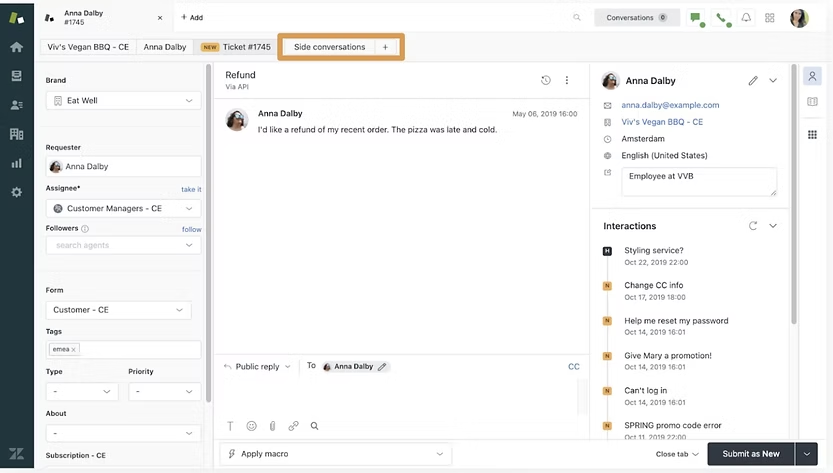
Zendesk’s Side Conversations allow agents to launch targeted discussions directly from a ticket. These can be sent as internal messages to colleagues or as emails to external partners, such as suppliers or contractors, while keeping all replies stored within the ticket.
This means an agent can ask finance to verify a refund, loop in a shipping vendor for tracking details, and coordinate with the product team for a bug fix without starting separate email chains or losing important information in another platform.

Always reference the ticket number and include relevant context in the initial Side Conversation message so the recipient understands the whole situation without back-and-forth clarification.
2. Light Agents: Give Stakeholders the Right Access
Light Agents are ideal for people who need visibility into tickets but do not require full agent permissions. They can read tickets, add private notes, and join Side Conversations, making them perfect for legal advisors, finance managers, operations coordinators, or even executives who want to stay informed.
This role prevents clutter in the main ticket queue while ensuring stakeholders can contribute without disrupting agent workflows. On many Zendesk plans, Light Agents do not consume full-priced agent seats, which keeps collaboration cost-efficient.
Create a “Light Agent Guidelines” doc so contributors know when and how to add notes, ensuring feedback is structured and actionable.
3. Slack Integration: Real-Time Multi-Team Updates
The Zendesk-Slack integration keeps support updates flowing to the teams that need them, in the tools they already use. By connecting the two platforms, you can push ticket notifications such as high-priority escalations or SLA breach alerts into dedicated Slack channels.
This setup enables non-support staff to view important updates instantly. In some configurations, agents can reply to tickets directly from Slack. It is especially powerful for keeping cross-functional projects aligned, like product launches or incident responses.
Best Practice: Create separate Slack channels for different ticket types or priorities to prevent information overload and ensure clear communication. For example:
- #support-escalations for urgent cases
- #support-product-issues for bugs
- #support-vip for high-value customers
4. Jira Integration: Close the Loop Between Support and Engineering
When tickets require product fixes or technical investigation, the Zendesk-Jira integration bridges the gap between support and development teams. Support agents can create a linked Jira issue directly from the Zendesk ticket, ensuring engineers receive all relevant customer details without duplication.
Updates from Jira, such as status changes or resolution notes, sync back to Zendesk automatically. This enables the support team to keep customers informed without needing to check Jira or request updates from engineers manually.
Establish a “Support-to-Jira Handoff Checklist” that includes reproduction steps, customer environment details, and severity level to reduce back-and-forth questions.
5. Build a Unified Collaboration Workflow
Here is how these features and integrations work together in a real-world workflow:
- A customer reports a checkout bug.
- The agent starts a Side Conversation with the product team to verify if it is a known issue.
- The product manager, a Light Agent, reviews the ticket and adds private notes confirming the bug.
- The agent creates a linked Jira issue with reproduction steps and priority level.
- The Jira update automatically flows back to Zendesk when the fix is deployed.
- At the same time, a Slack alert is sent to the #support-escalations channel so sales and marketing are aware of potential customer impact.
This end-to-end workflow keeps every stakeholder informed while keeping all context inside Zendesk, reducing delays and eliminating scattered communication threads.
6. Measure Collaboration Success with Zendesk Explore
To ensure your collaboration strategy is working, track these metrics in Zendesk Explore:
- Average resolution time for tickets requiring cross-team input
- SLA compliance rates for escalated tickets
- Number of Side Conversations per ticket
- Light Agent activity levels
- Jira-linked ticket resolution time
Regularly reviewing these metrics helps identify bottlenecks and optimize processes for even faster resolutions.
Conclusion
Zendesk’s collaboration features, when combined with Slack and Jira, turn your help desk into a central command center for multi-department support. Side Conversations keep communication contextual, Light Agents bring the right stakeholders into the loop, Slack delivers instant updates, and Jira ensures engineering issues are tracked from start to finish.
By implementing this collaboration playbook, you will improve resolution speed, minimize miscommunication, and create a more seamless experience for both customers and internal teams.